@snort/worker-relay
A Nostr relay that runs inside a Web Worker, backed by SQLite via OPFS (Origin Private File System). Provides fast local queries, offline support, and persistent storage without any network round-trips.
How It Works
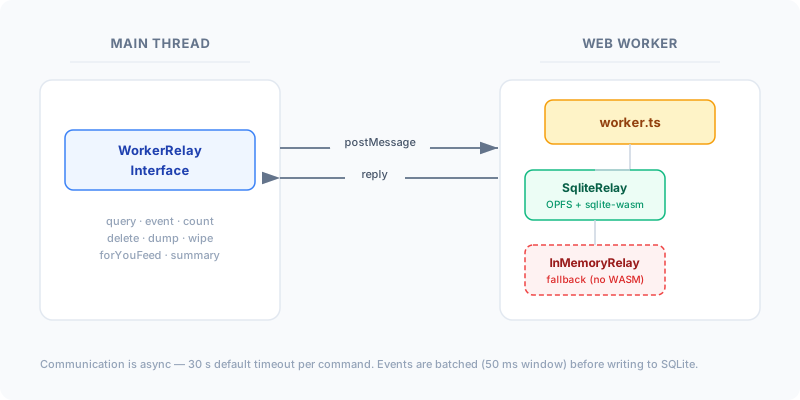
WorkerRelayInterfaceruns on the main thread. It serialises commands intopostMessagecalls and returns Promises that resolve when the worker replies.worker.tsruns inside a Web Worker (Dedicated or Shared). It receives commands, delegates to aRelayHandler, and posts replies back.SqliteRelayis the primary storage backend. It uses@sqlite.org/sqlite-wasmwith the OPFS SAH (Origin-Private File System, Structured Access Handle) pool for persistent, transactional storage.InMemoryRelayis a fallback that activates when WebAssembly is unavailable (e.g. restricted environments). Data is not persisted across sessions.
All communication is asynchronous. The interface sets a per-command timeout (default 30 s); if the worker doesn't reply in time the promise rejects.
Installation
bun add @snort/worker-relaySetup
Vite (recommended)
Vite can import the worker script as a Worker object for production builds, while in dev mode the ESM bundle is loaded directly:
import { WorkerRelayInterface } from "@snort/worker-relay";
import WorkerVite from "@snort/worker-relay/src/worker?worker";

const workerScript = import.meta.env.DEV
  ? new URL("@snort/worker-relay/dist/esm/worker.mjs", import.meta.url)
  : new WorkerVite();

const relay = new WorkerRelayInterface(workerScript);
Generic bundler / URL
If you're not using Vite's ?worker import, pass a URL string pointing to the bundled worker script:
import { WorkerRelayInterface } from "@snort/worker-relay";

const relay = new WorkerRelayInterface(
  new URL("@snort/worker-relay/dist/esm/worker.mjs", import.meta.url)
);
Initialise the database
await relay.init({
  databasePath: "relay.db",  // OPFS file path for the SQLite database
});
init() loads the SQLite WASM module, opens (or creates) the database at the given OPFS path, and runs any pending migrations. If WASM is unavailable it silently falls back to InMemoryRelay.
Use with NostrSystem
import { NostrSystem } from "@snort/system";
import { WorkerRelayInterface } from "@snort/worker-relay";
import WorkerVite from "@snort/worker-relay/src/worker?worker";

const cachingRelay = new WorkerRelayInterface(
  import.meta.env.DEV
    ? new URL("@snort/worker-relay/dist/esm/worker.mjs", import.meta.url)
    : new WorkerVite(),
);
await cachingRelay.init({ databasePath: "relay.db" });

const System = new NostrSystem({ cachingRelay });
await System.Init();
When a cachingRelay is configured, NostrSystem automatically writes incoming events to it and checks the cache before querying remote relays.
WorkerRelayInterface API
Constructor
new WorkerRelayInterface(scriptPath?: string | URL | Worker)| Parameter | Description |
|---|---|
scriptPath | A URL string, URL object, or a pre-constructed Worker instance. If omitted, defaults to @snort/worker-relay/dist/esm/worker.mjs resolved against import.meta.url. |
Properties
| Property | Type | Default | Description |
|---|---|---|---|
timeout | number | 30_000 | Per-command timeout in milliseconds. If the worker doesn't reply within this window the promise rejects with a Timeout error. |
Methods
init(args: InitArgs): Promise<boolean>
Initialise the worker relay. Must be called before any other method.
interface InitArgs {
  databasePath: string; // OPFS file path, e.g. "relay.db"
}
Returns true on success. Throws if the worker fails to initialise.
event(ev: NostrEvent): Promise<OkResponse>
Write a single event to the relay. The reply is optimistic — the event is buffered and flushed to SQLite in a batched transaction (50 ms window), so the caller is not blocked on disk I/O.
interface OkResponse {
  ok: boolean;
  id: string;
  relay: string;
  message?: string;
  event: NostrEvent;
}
Events are deduplicated by ID. Replaceable events (kinds 0, 3, 41, 10000–19999) and parameterized replaceable events (kinds 30000–39999) automatically replace older versions. Kind 5 deletion events are honoured.
query(req: ReqCommand): Promise<NostrEvent[]>
Query the relay using standard Nostr REQ syntax. Supports multiple filters (they are OR'd together with deduplication).
type ReqCommand = ["REQ", id: string, ...filters: Array<ReqFilter>]

const results = await relay.query([
  "REQ",
  "sub-1",
  { kinds: [1], authors: ["pubkey..."], limit: 50 },
]);
count(req: ReqCommand): Promise<number>
Count events matching a filter. Same filter syntax as query(), but returns a count instead of full events.
const total = await relay.count(["REQ", "count-1", { kinds: [1] }]);delete(req: ReqCommand): Promise<string[]>
Delete events matching a filter. Returns an array of deleted event IDs.
const deleted = await relay.delete(["REQ", "del-1", { kinds: [1], authors: ["pubkey..."] }]);summary(): Promise<Record<string, number>>
Get a count of events grouped by kind. Keys are stringified kind numbers.
const counts = await relay.summary();
// { "0": 142, "1": 53820, "3": 89, ... }
close(id: string): Promise<boolean>
Close a subscription by its ID. Returns true on success.
dump(): Promise<Uint8Array>
Export the entire database as a binary Uint8Array. Useful for backups. While the dump is in progress, concurrent writes and queries are blocked.
const data = await relay.dump();
// Save or send the binary data
wipe(): Promise<boolean>
Delete all data from the database. The database file is removed, recreated, and migrations are re-run. Returns true on success.
forYouFeed(pubkey: string): Promise<NostrEvent[]>
Generate a personalised "For You" feed for the given pubkey. The algorithm:
- Finds events you've reacted to (kinds 1, 6, 7, 9735)
- Identifies authors you react to and other users who react to the same events
- Collects events those users have reacted to (excluding your own)
- Scores events by reaction count, author favouriteness, and recency
- Returns top posts sorted by score
setEventMetadata(id: string, meta: EventMetadata): void
Fire-and-forget: marks when an event was last seen. Internally batches setSeenAt calls within a 50 ms window and flushes them as a single SQL UPDATE. No reply is sent.
interface EventMetadata {
  seen_at?: number;
}
configureSearchIndex(config: Record<number, string[]>): Promise<void>
Configure which event tags should be indexed for full-text search, keyed by kind.
await relay.configureSearchIndex({
  1: [],           // index kind 1 content only (no tags)
  30023: ["d"],    // index kind 30023 content + "d" tag values
});
Kind 0 (profile) events are always indexed (name, display_name, about, website, lud16, nip05).
debug(v: string): Promise<boolean>
Enable verbose debug logging in the worker. Pass "*" to enable all scopes. Returns true.
await relay.debug("*");Filter Syntax
Queries use the standard Nostr filter format:
interface ReqFilter {
  ids?: string[];       // Event IDs
  authors?: string[];   // Author pubkeys
  kinds?: number[];     // Event kinds
  search?: string;      // Full-text search query
  since?: number;       // Unix timestamp (inclusive)
  until?: number;       // Unix timestamp (exclusive)
  limit?: number;       // Max results
  "#e"?: string[];     // Tag filters (single-character tag names)
  "#p"?: string[];     // ...
  "&e"?: string[];     // AND-tag filter (all values must match, not just one)
  ids_only?: boolean;  // Internal: return IDs only instead of full events
}- Tag filters prefixed with
#are OR filters — an event matches if it has any of the listed tag values. - Tag filters prefixed with
&are AND filters — an event matches only if it has all of the listed tag values.
Event Handling
Replaceable Events
The relay automatically handles replacement semantics:
| Kind Range | Behaviour |
|---|---|
| 0, 3, 41 | Legacy replaceable — only the newest event per (kind, pubkey) is kept |
| 10000–19999 | Standard replaceable — same as above |
| 30000–39999 | Parameterized replaceable — only the newest event per (kind, pubkey, d-tag) is kept |
Deletion Events (Kind 5)
When a kind 5 event is inserted, the relay:
- Deletes events referenced in
etags if the deletion author matches the event author - Deletes events referenced in
atags if the deletion author matches theatag pubkey - Returns
trueif any events were actually deleted
Deduplication
A 50 000-entry in-memory set tracks recently inserted event IDs to avoid redundant INSERT OR IGNORE round-trips. When the cap is hit the set is cleared — correctness is preserved because SQLite's INSERT OR IGNORE provides definitive dedup at the database layer.
Write Batching
Both event inserts and seen_at updates are batched inside the worker:
| Operation | Batch Window | Behaviour |
|---|---|---|
event() | 50 ms | Events are accumulated; the caller receives an optimistic OkResponse immediately. All pending events are flushed in a single SQLite transaction when the timer fires. |
setEventMetadata() / setSeenAt | 50 ms | Fire-and-forget — no reply is sent. IDs are accumulated and flushed as one UPDATE statement per tick. |
This dramatically reduces SQLite write overhead when many events arrive in quick succession (e.g. initial relay sync).
Full-Text Search
The relay maintains an FTS5 virtual table (search_content) for full-text search via the search filter field. Content is indexed as follows:
- Kind 0 (profiles): Always indexed —
name,display_name,about,website,lud16,nip05 - Other kinds: Content is indexed only if the kind is configured via
configureSearchIndex(). Any specified tag values are included alongside the eventcontent.
Search queries have . and @ replaced with + to improve tokenisation.
// Enable search on kind 1 event content
await relay.configureSearchIndex({ 1: [] });

// Search
const results = await relay.query([
  "REQ",
  "search-1",
  { kinds: [1], search: "hello world", limit: 20 },
]);
Database Schema
The SQLite database uses the following schema (after all migrations):
CREATE TABLE events (
  id TEXT(64) PRIMARY KEY,
  pubkey TEXT(64),
  created INTEGER,
  kind INTEGER,
  json TEXT,           -- Full event JSON
  seen_at INTEGER,     -- Timestamp when event was last seen
  relays TEXT          -- Comma-separated relay URLs
);

CREATE TABLE tags (
  event_id TEXT(64),
  key TEXT,            -- Single-character tag name (e.g. "e", "p")
  value TEXT,          -- Tag value
  CONSTRAINT tags_FK FOREIGN KEY (event_id) REFERENCES events(id) ON DELETE CASCADE
);

CREATE VIRTUAL TABLE search_content USING fts5(
  id UNINDEXED,
  content
);
Indexes
| Index | Columns | Purpose |
|---|---|---|
tags_key_IDX | (key, value) | Tag lookups (#e, #p, etc.) |
kind_created_IDX | (kind, created DESC) | Kind-only filters with ORDER BY |
pubkey_kind_created_IDX | (pubkey, kind, created DESC) | Author + kind queries |
seen_at_IDX | (seen_at) | Seen-at timestamp queries |
tags_event_id_IDX | (event_id) | FK cascade deletes and parameterized-replaceable JOINs |
Migrations
Migrations are tracked in the __migration table and run automatically on init(). The current schema version is 7.
InMemoryRelay Fallback
When WebAssembly is not available (e.g. in restricted browser environments), the worker automatically falls back to InMemoryRelay:
- Stores events in a plain
Map<string, NostrEvent> - Full filter support (including tag filters and AND-tags)
- Not persisted — data is lost when the worker terminates
sql(),setEventMetadata(),batchSetSeenAt(), andconfigureSearchIndex()are no-ops
The fallback is transparent — the same WorkerRelayInterface API works regardless of which backend is active.
Worker Types
The worker script supports both Dedicated and Shared Worker globals:
- DedicatedWorkerGlobalScope: Uses the standard
onmessagehandler. This is the default and what Vite's?workerimport creates. - SharedWorkerGlobalScope: Uses the
onconnecthandler, allowing multiple tabs to share the same worker instance.
The script detects the scope at runtime and registers the appropriate handler automatically.
See Also
- @snort/system — Core system library
- Caching — Cache system and CacheRelay integration
- Examples → Worker Relay